Table of contents
Integration for a PayPal payment instrument
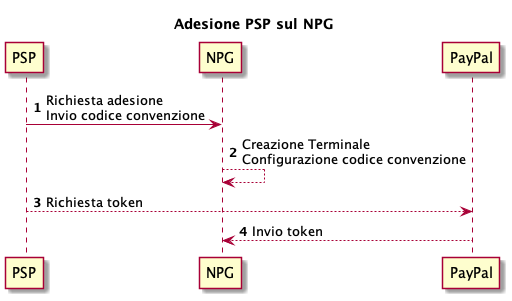
If a registered PSP wants to be certified on the Payment Gateway (NPG) of PagoPA S.p.A., enabling the PayPal® payment method, they must follow these steps:
- send a request to register with the Payment Gateway containing the agreement code provided by PayPal®;
- The terminal is configured on the Payment Gateway, enabling the payment methods with the agreement code indicated by the registered PSP;
- to complete the authorization, the registered PSP must use the Payment Gateway wizard to access the PayPal dominion with its business users to generate the relative token;
- the generated token is configured on the terminal set in point 2.
Please keep in mind that PagoPA S.p.A. does not enter into agreements with PayPal®, therefore it is the responsibility of the registered PSP to contact PayPal® if they want to offer this payment instrument on NPG.
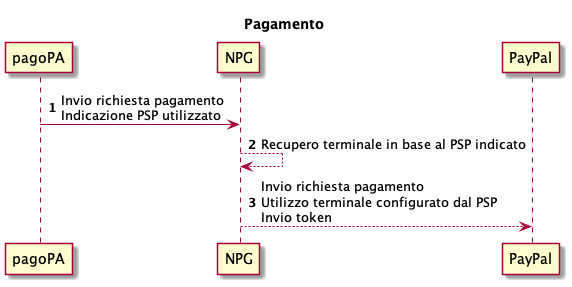
When paying a notice number, the terminal related to the registered PSP selected by the citizen is used for the communication between the payment gateway and PayPal®.
The call to PayPal® also sends the token generated by the registered PSP during the registration phase.
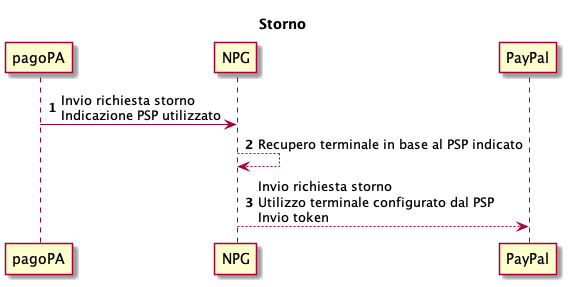
When canceling a payment, the same terminal related to the PSP PayPal® selected during the payment phase is used.
The call to payment instrument also sends the token generated by the PSP during the registration phase.


Tell us what you think
For clarifications on implementation specifications, such as SACI and SANP, you can open an issue on GitHub