Table of contents
Offering payment systems on PagoPA S.p.A. touchpoints
This chapter describes how a PSP can offer a payment on the pagoPA platform using digital payment instruments (credit or debit card, current account, digital wallet) through the touchpoints managed directly by the pagoPA platform.
The payment methods available on the pagoPA touchpoints are divided into 2 macro groups:
- Natively integrated with the Payment Gateway: with particular reference to the payment instruments subject to the Payment Card Industry Data Security Standard (PCI DSS), their use is “centralized” on the pagoPA platform as the data of the payment instrument is managed directly by the pagoPA platform via its Payment Gateway component provided by a certified supplier of PagoPA S.p.A. The PSP must register itself and provide PagoPA S.p.A.with the specific data required by each payment instrument. The payment instruments natively integrated with the Payment Gateway are:
- Visa®
- Mastercard®
- Amex®
- PayPal®
- ApplePay®
- GooglePay®
- BancomatPay®
- MyBank®
- Satispay®
- Integrated in redirect mode: all the payment instruments that are not natively integrated with the Payment Gateway, which are based on debiting the current account and/or are natively offered by the individual PSP and evaluated as compatible, to guarantee an optimal user experience for the payer.
A precondition of the PSP to be able to enable all the available payment instruments as specified in the previous sections - including redirect mode - is the integration of the payment node according to the specifications of the single mode and definition of the information data catalog via the pagoPA backoffice, which is available in the Reserved Area.
The payer's user experience differs based on the following:
- guest user: for each payment, the payer enters their data each time for their digital payment instrument and proceeds with the payment;
- registered user: by using SPID (Public Digital Identity System) or CIE (Electronic Identity Card), the user can store their payment instruments (if available) and use them for the following payments, minimizing the interactions, reducing the insertion of payer data and managing the transaction as smoothly as possible.
In both cases, the payment process is described briefly in these points:
- the user can select the stored payment instrument or enter new data for the payment instrument, using the pagoPA touchpoint interfaces;
- it is ALWAYS possible for the user to change the selection suggested by pagoPA platform;
- a summary page of the payment is shown;
- upon confirmation of the operation, the payment is made according to the methods required by the selected payment instrument;
- once the payment phase is complete, the pagoPA platform sends the details of the notices associated with the transaction to the PSP;
- when the selected PSP undertakes to repay the amount received to the institutes, an email is sent to the user containing the detail of the payment that was made;
- if the PSP does not accept the payment, the pagoPA platform will cancel the requested payment and communicate the failed payment to the user via e-mail.
Integration and workflow for the PSP/payment instrument integrated with the Payment Gateway
Two transactions must be configured for card payment instruments (3DS 2.0):
- channel used for card on-boarding
- channel for payments by registered users
As per EU Directive 2015/2366 (“PSD2”), during every payment, the Issuer is required to require the strong authentication of the payer (SCA) to proceed with the operations (storage of the instrument or payment).
The payment operation takes place in two steps:
- authorization and accounting;
- cancellation if necessary.
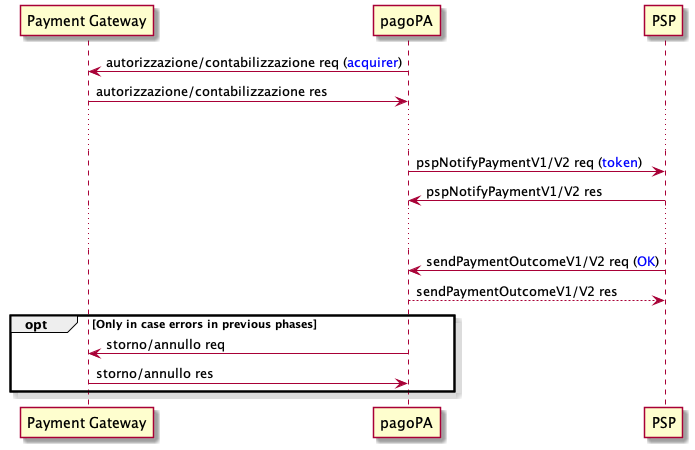
- Once the payment instrument and the PSP have been selected, the payer triggers the action of the client;
- the pagoPA platform requests verification of the availability of the amount by means of a call to the Payment Gateway;
- the Payment Gateway returns the outcome of the authorization;
- the eCommerce component of the pagoPA platform aligns the Node component;
- if the outcome of the authorization is positive, the pagoPA platform communicates to the PSP that authorization was successful, using the primitive pspNotifyPayment:
- the section additionalPaymentInformations contains the identifiers and the response obtained from the Payment Gateway so that the PSP can verify the payment operation;
- if the PSP sends a sendPaymentOutcome after responding with NOK to the pspNotifyPayment, the node would respond with NOK to signal the discordant outcome;
- subsequently, the PSP communicates the conclusion of the payment within 2 sec, using the call sendPaymentOutcome, committing to crediting the amount to the above current accounts that were received;
- if the PSP sends an outcome = NOK after accepting the sendPaymentOutcome, the node would respond with NOK to signal the discordant outcome;
- the pagoPA platform records the closure of the payment, and sends the receipt of the operation to the creditors, unless technical problems occurred, and in that case the pagoPA platform would send a request to cancel the amounts;
- if the PSP responds with NOK to the call pspNotifyPayment, the platform cancels the operation and the committed amounts return to the possession of the user. The PSP must not send the communication of the payment outcome using the call sendPaymentOutcome.


Tell us what you think
For clarifications on implementation specifications, such as SACI and SANP, you can open an issue on GitHub