Table of contents
OpenAPI recovery endpoint of remote content
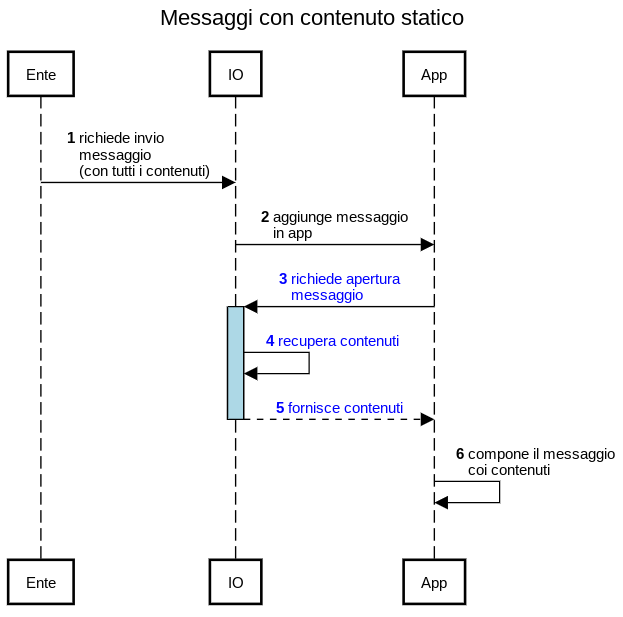
In the case of sending a message traditionally on IO, the institution calls the exposed API for the creation of the message and IO proceeds with its complete management in app:
The following diagram shows the sequence of events that involve your system and the IO system for exchanging information with the recipient of a message with remote content:
.png)
Detailed diagram
The sequence of events that make up the life cycle of a remote content message are shown below in more detail:
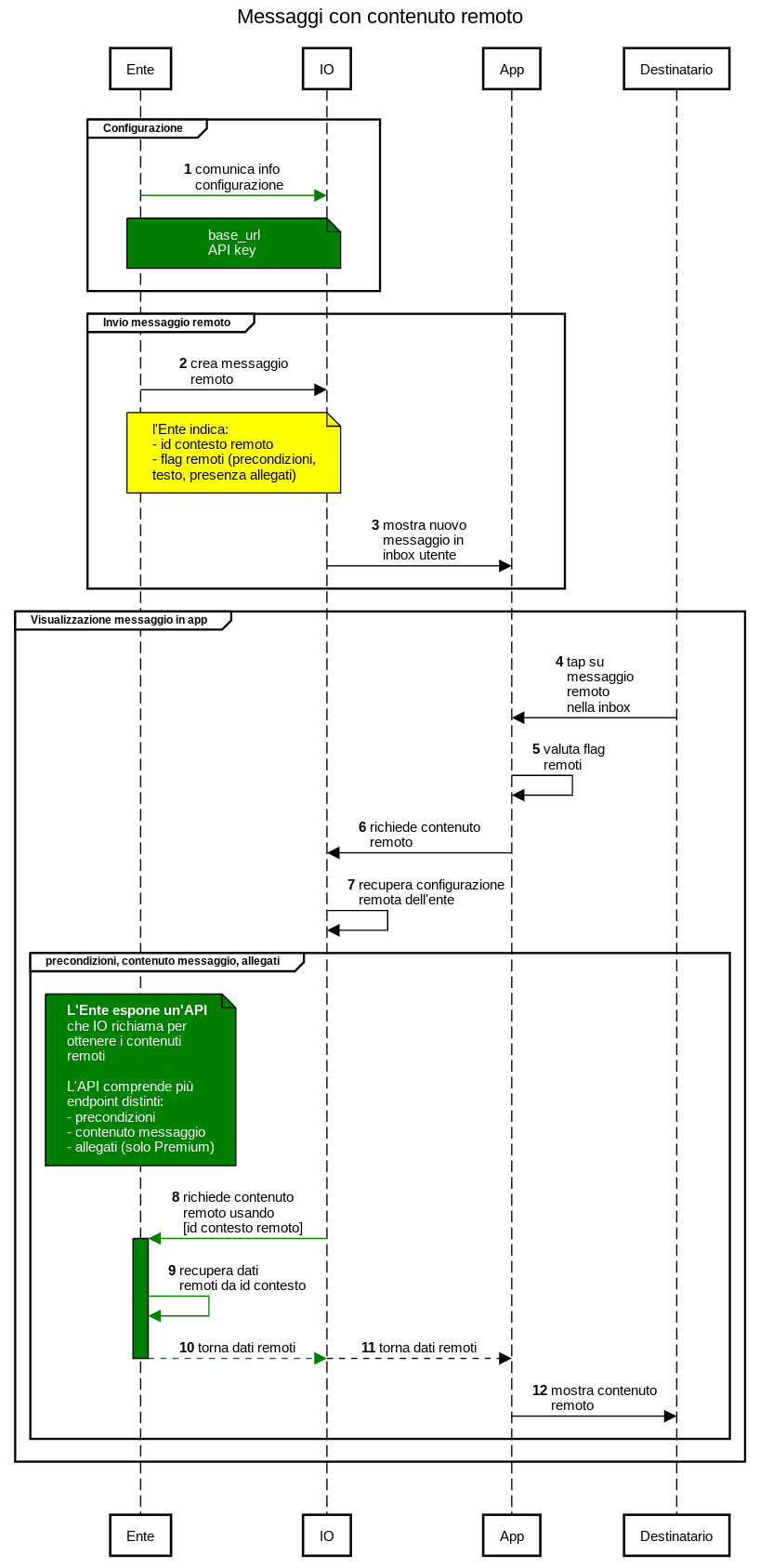
The following chapters show the detailed sequence of each phase.
Retrieval endpoint of preconditions when opening the message
If during the Creazione del messaggio con contenuto remoto you included the field https://github.com/pagopa/devportal-docs/blob/docs/from-gitbook/docs/zF3c54RkRPgTmqLF0IKo/api-and-specifications/api-messaggi/submit-a-message-passing-the-user-fiscal_code-in-the-request-body.md#has_precondition (or if you had indicated it in the Remote configuration) phase, at the time when the message is opened by the recipient, IO will retrieve the preconditions through a call GET to your systems, containing the following parameters in input:
- The remote correlationid you indicated in the https://github.com/pagopa/devportal-docs/blob/docs/from-gitbook/docs/zF3c54RkRPgTmqLF0IKo/api-and-specifications/api-messaggi/submit-a-message-passing-the-user-fiscal_code-in-the-request-body.md#third_party_data block when sending the message;
- the fiscal code of the recipient (as the header).
Your systems will need to verify that the fiscal code sent as input exactly matches the intended recipient, and if it does, the contents of the preconditions will be transmitted to IO.
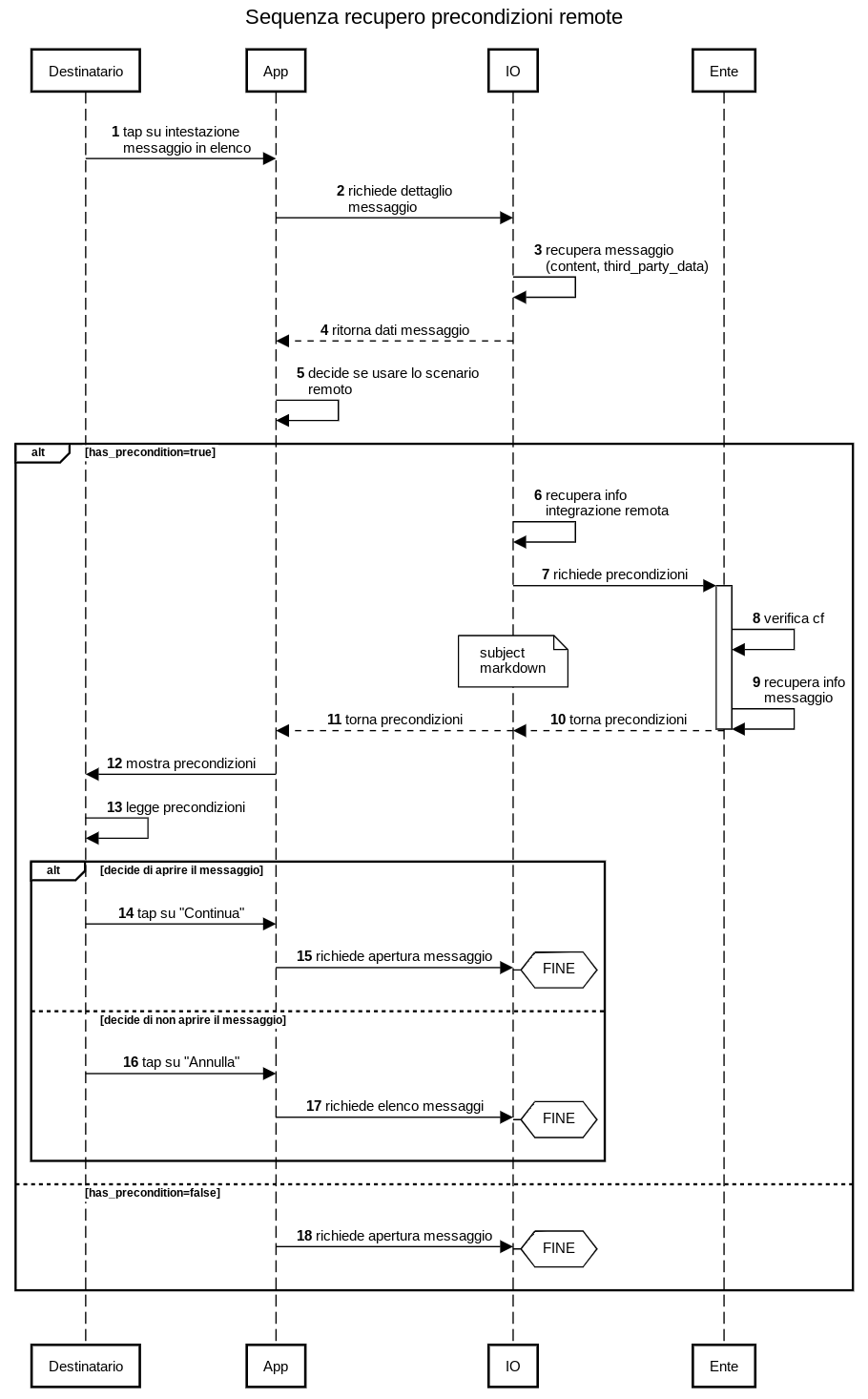
IO will use the base_url, which you communicated when setting the remote configuration information, and the correlation identifier, which you specified in the https://github.com/pagopa/devportal-docs/blob/docs/from-gitbook/docs/zF3c54RkRPgTmqLF0IKo/api-and-specifications/api-messaggi/submit-a-message-passing-the-user-fiscal_code-in-the-request-body.md#third_party_data block, when sending the message, when sending the message, to create a GET call in the form of {base_url}/messages/{id}/precondition:
get
Retrieval endpoint of message details
If during the Creazione del messaggio con contenuto remoto you included the flag https://github.com/pagopa/devportal-docs/blob/docs/from-gitbook/docs/zF3c54RkRPgTmqLF0IKo/api-and-specifications/api-messaggi/submit-a-message-passing-the-user-fiscal_code-in-the-request-body.md#has_remote_content or, being a Premium institution, the flag https://github.com/pagopa/devportal-docs/blob/docs/from-gitbook/docs/zF3c54RkRPgTmqLF0IKo/api-and-specifications/api-messaggi/submit-a-message-passing-the-user-fiscal_code-in-the-request-body.md#has_attachments, IO must retrieve the content of the messages from your systems at the moment it is displayed in app, and will use the API described here; it will do it with a GET call, with which it will return to you:
- The remote correlationid you indicated in the https://github.com/pagopa/devportal-docs/blob/docs/from-gitbook/docs/zF3c54RkRPgTmqLF0IKo/api-and-specifications/api-messaggi/submit-a-message-passing-the-user-fiscal_code-in-the-request-body.md#third_party_data block when sending the message;
- the fiscal code of the recipient (as the header).
Your system can then retrieve the content of the message, while checking that the received request is actually related to that recipient.
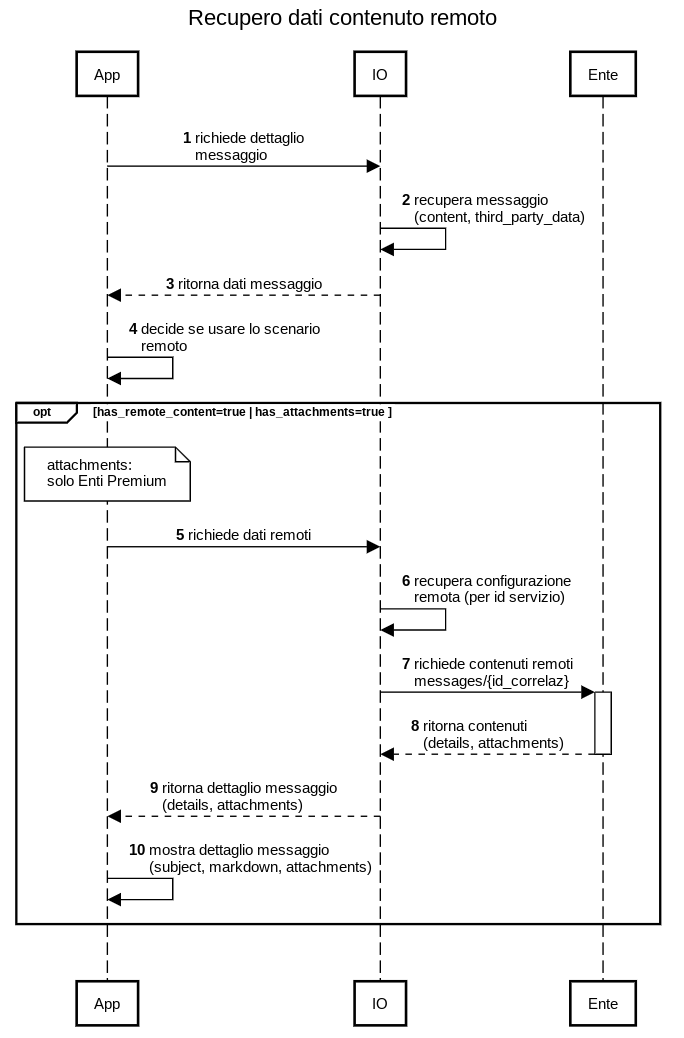
IO will use the base_url, which you communicated to the IO team when setting the remote configuration information, and the correlation identifier, which you specified in the https://github.com/pagopa/devportal-docs/blob/docs/from-gitbook/docs/zF3c54RkRPgTmqLF0IKo/api-and-specifications/api-messaggi/submit-a-message-passing-the-user-fiscal_code-in-the-request-body.md#third_party_data block, when sending the message, to create a GET call in the form of {base_url}/messages/{id}:
get
Example of an expected response from IO
Depending on the flags you specified https://github.com/pagopa/devportal-docs/blob/docs/from-gitbook/docs/zF3c54RkRPgTmqLF0IKo/api-and-specifications/api-messaggi/submit-a-message-passing-the-user-fiscal_code-in-the-request-body.md#third_party_data during Creazione del messaggio con contenuto remoto, in response to the API you should include:
| If [flag]=true | Structure to insert | Description |
|---|---|---|
| has_remote_content | details | Complete message subject and body. For more information please refer to https://github.com/pagopa/devportal-docs/blob/docs/from-gitbook/docs/zF3c54RkRPgTmqLF0IKo/api-and-specifications/openapi-endpoint-di-recupero-dei-contenuti-remotizzati.md#struttura-details-titolo-e-corpo-del-messaggio |
| has_attachments | attachments | Only for Premium Institutions: fill in the metadata of the message attachments. For more information please refer to https://github.com/pagopa/devportal-docs/blob/docs/from-gitbook/docs/zF3c54RkRPgTmqLF0IKo/api-and-specifications/openapi-endpoint-di-recupero-dei-contenuti-remotizzati.md#struttura-attachments-allegati-pdf |
Structure details: message subject and body
The example below shows what can return in the details structure in case of a remote content message if you specified has_remote_content=true:
1{
2  "details":
3  {
4    "subject": "This is the title of the message",
5    "markdown": "This is the body of the message in **markdown** format"
6  }
7}
8
This is how the message set in this way appears in app:
.png)
attachmentsstructure: PDF attachments
If your organization signed the Premium agreement, here is an example of what you can indicate if you specified has_remote_content=truein the details structure:
% code overflow="wrap" %}
1{
2  "attachments": [
3    {
4      "id": "7de61a5a-6829-4f76-9e37-dfd229cd3d62",
5      "content_type": "application/pdf",
6      "name": "Attachment 1.pdf",
7      "url": "/io_attachments/410034f7-6cfd-43ef-b58b-2da1375ee218",
8      "category": "DOCUMENT"
9    },
10    {
11      "id": "1d9e3a59-2eed-496c-84dd-1fb9682d24eb",
12      "content_type": "application/pdf",
13      "name": "Attachment 2.pdf",
14      "url": "/io_attachments/0004b1f5-7414-4db8-b9e0-1e38a7730fca",
15      "category": "DOCUMENT"
16    }
17  ]
18}
19
The table indicates the meaning of each field:
| Field | Permitted format | Notes |
|---|---|---|
| id | string | IO requires that the id field must contain an identifier of the single attachment that is univocal in the message: it is your responsibility to define this field and guarantee that it is univocal across your systems. The example shows the use of a GUID. |
| content_type | enumerated string | It must contain the "application/pdf" value as IO accepts only attachments in PDF format compliant with standard PDF/A-2a. |
| name | string (ending in ".pdf") | It must contain the name of the attachment as it will appear in the message, in the “Attachments” section: select it carefully in order to communicate correctly with your recipient. ⚠️ It is mandatory to always add the extension ".pdf". |
| url | string (in partial URL format) | It must contain the relative path to download the attachment. This is because IO downloads the attachments with a GET request to the address {baseUrl}/messages/{id}/{url}, where :
|
| category | enumerated string | It must contain the value "DOCUMENT" |
Retrieval endpoint of the bytes of the individual attachment
If you singed the Premium agreement and in the detailed API response shown in the previous chapter you included the metadata for one or more attachments, when the recipient of the message wants to view them, IO will recover the content from your systems, using the URL of a GET call in {baseUrl}/{id}/{url} format, where:
- baseUrl is the common part (initial) of the endpoints that you communicated to the IO team when setting the remote configuration information;
- {id} is the identifier you specified in the https://github.com/pagopa/devportal-docs/blob/docs/from-gitbook/docs/zF3c54RkRPgTmqLF0IKo/api-and-specifications/api-messaggi/submit-a-message-passing-the-user-fiscal_code-in-the-request-body.md#third_party_data block when sending the message;
- {url} is the completion of the specific baseUrl for the attachment in question, as returned in the metadata with the detailed API.
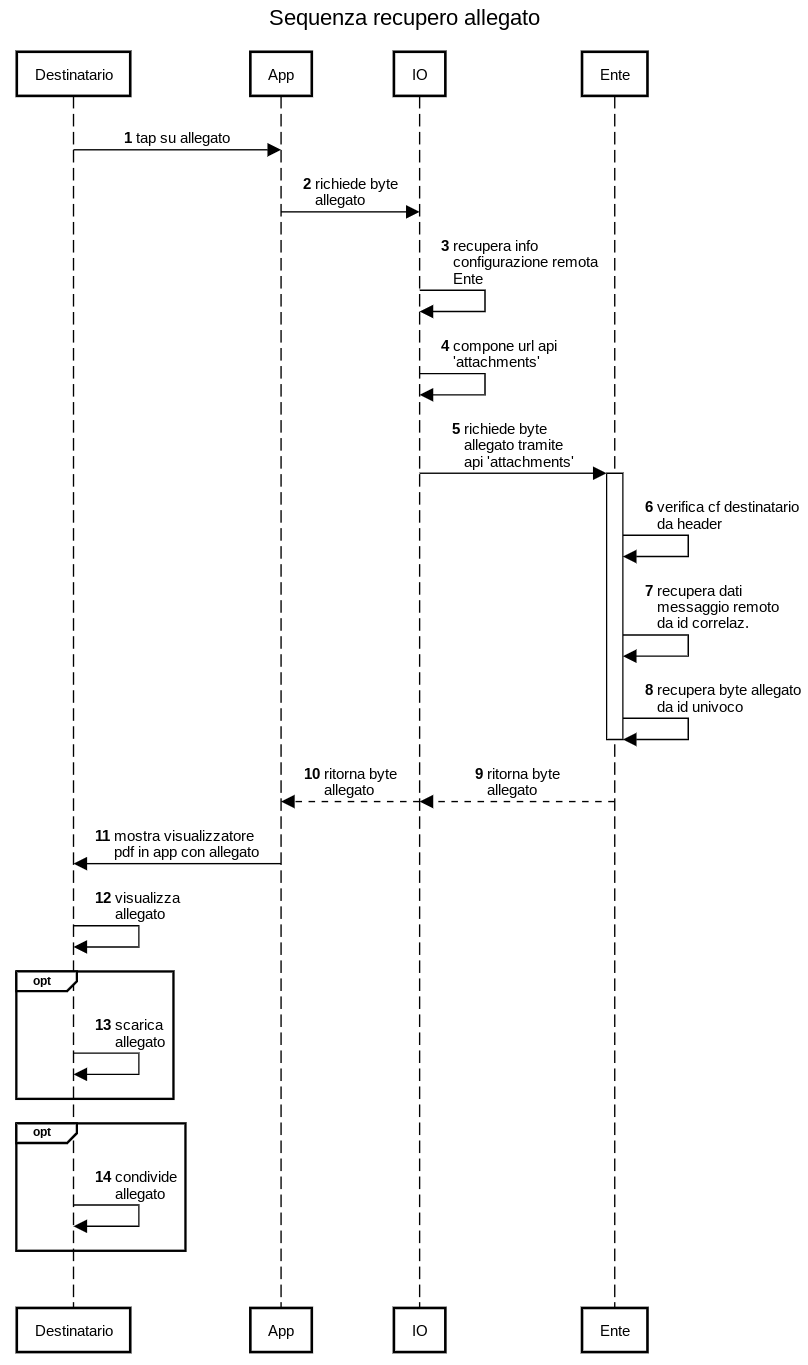
get
API Key
IO guarantees that the fiscal code in the request corresponds to fiscal code of the user who is trying to retrieve the message data. The fiscal code is send through the fiscal_codeheader.
Note about ” headers
All the APIs described here include a set of optional headers called '’x-pagopa-lollipop-..." and two headers of "signature", which do not have to be valued, but whose reception we ask you not to exclude.
Useful resources

Haven't completed onboarding yet and need help?
Write an email describing your problem or question to the address areariservata@assistenza.pagopa.it.


Tell us what you think
To report problems or give feedback, leave a comment in the GitHub space of the IO app