Table of contents
Electronic Identity Card
Providing the “Electronic Identity Card” service via IO makes it possible for institutions to:
- provide citizens with detailed communications about the state of their Electronic Identity Card (CIE), covering the entire life cycle of the service, from the beginning to the end;
- integrate communications, avoiding a duplication of communications regarding the expiration of the CIE, managed by ANPR.
Service tab and attributes
| Name of the service | Electronic Identity Card |
|---|---|
| Topic | Registry and civic services |
| Description of the service | The service concerns the request, issue and expiration of your Electronic Identity Card. With IO, you can:
For more information about the Electronic Identity Card, visit this website. |
| Button | Request an appointment |
Life cycle of the service
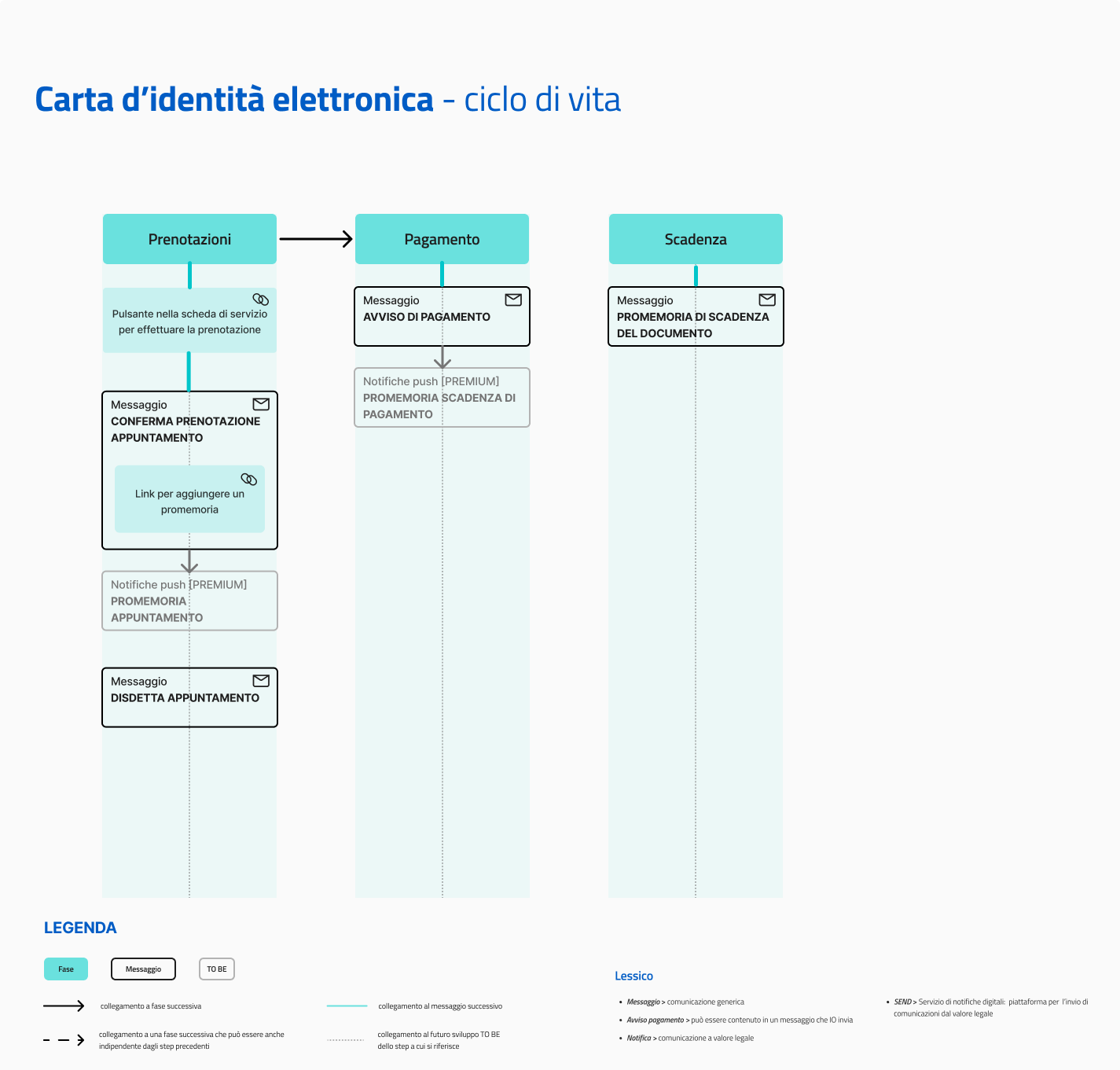
Service messages
Here is the list of various messages the service can send, with the relative rules for sending them.
Appointment confirmation
🖋 Title of the message: Your appointment with <office>
🗒 Text of the message:
Please remember that you have an appointment with the <office> located in <address> on <dd/mm/yyyy> at <hh:mm>.
Please arrive at least 15 minutes before your appointment and bring all your necessary documents with you. For more information about the document you need, visit the website CIE.
You can cancel the appointment online, at [website name](URL).
🪄 Button: Add reminder
---
Recipients: Citizens who successfully made an appointment on the website of the institution
When to send it: When the appointment has been made
User story: As a citizen I want to receive a confirmation with details of my appointment
Appointment cancellation
🖋 Title of the message: Cancel appointment with <office>
🗒 Text of the message:
Your appointment with the <office> located in <address> on <dd/mm/yyyy> at <hh:mm> was canceled due to <description of the reason>.
If you want to make a new appointment online, you can use the appointment service (URL) for your municipality or go to the registry office that best meets your needs.
🪄 Button: n/a
---
Recipients: Citizens whose appointment was canceled by the citizens themselves or due to needs of the city hall
When to send it: At the moment the appointment is canceled
User story: As a citizen I want to be informed when an appointment is canceled
Notification of identity card payment
✨️ Premium message — configure this message as Premium, the citizen will be informed that payment date is coming closer with a push notification!
🖋 Title of the message: You have a new payment notification
🗒 Text of the message:
There is a payment notification for <first and last name> regarding the issue of an Electronic Identity Card.
Amount due: € <xx.xx>
Due date: <dd/mm/yyyy>
You can pay directly in-app by pressing “See notification”, or using all the payment channels of the pagoPA platform.
If you already made the payment, ignore this message.
For more information or if you need assistance, contact us using the channels located on the service tab.
🪄 Button: See notification
Recipients: All citizens who have to pay for the document
When to send it: When an appointment has been made at city hall and after the amount has become due
User story: As a citizen, I want to receive a communication when it is possible to make the payment for my Identity Card

Haven't completed onboarding yet and need help?
Write an email describing your problem or question to the address areariservata@assistenza.pagopa.it.


Tell us what you think
To report problems or give feedback, leave a comment in the GitHub space of the IO app