Table of contents
Send a message with remote content
What are messages with remote content?
Messages with remote content respond to the need to send communications containing personal data and/or sensitive data via IO to citizens, guaranteeing their management in compliance with privacy regulations. In fact, by selecting this sending method the information is not stored on IO, but retrieved from your system each time the user accesses the message in app.
For a message, remote contents are:
- subject;
- body;
- opening preconditions (optional, e.g.: disclaimer);
- attachments (Premium).
What changes?
📐 Architecture
Unlike traditional sending, where the content of the message is transmitted to the IO systems, with the remote messages these contents reside only on your systems and IO will retrieve them each time that the recipient user wants to view them in app.
.png)
In this way, IO acts as a **real-time communication** channel between you and your user and keeps only the information necessary for retrieving the message and check its status.
🕵️♂️ Management of sensitive information
As specified, remote messages are meant for guaranteeing the privacy compliant sending of personal/sensitive information related to the recipient, if necessary for providing the service.
As an additional privacy protection measure, the flag Require_secure_channels allows your to mark a message as containing sensitive information, with the following effects:
- push notifications on the devices of the recipient will show a generic invitation to open the message, without showing the content of the subject;
- the messages will not be forwarded via email regardless of the preference set by the recipient user.
✏️ Updating contents over time
Unlike traditional messages, remote content messages can be changed also after they are sent: you can, for example, correct a typo or dynamically update information that is no longer valid or is misleading (e.g.: after canceling an appointment).
When considering this option, keep in mind that:
- The recipient user will not receive any notification if the content of a previously received message is updated. In fact, the content can be updated by retrieving it from your systems only when and if the user opens the message in app;
- The sending institution remains responsible for the information sent via IO.
User case for booking an appointment - Example of updating the contents of a message after sending it
1. Your institution sends the recipient citizen a message with remote content to confirm the appointment booked for a health service: 2. The recipient reads the message and decides to cancel the appointment using the channels you provided for managing appointments; 3. Your institution sends the user a **new message** to confirm the cancellation; 4. To ensure the coherence of the information, the institution **updates the contents of the first message**, replacing and/or deleting the information confirming the appointment and the obsolete references.
To make the recipient aware of the fact that the contents could have been updated over time, the following notification was included at the bottom of the details of your messages with remote content, in a brief and extended form:
.jpg)
.jpg)
How is a remote content message sent?
The life cycle of a message with remote content is made of up two main phases:
- The sending (creation) by the systems of your organization;
- The use (display) by the recipient.
.png)
Both phases require an integration between your systems and the IO systems.
Message sending phase
Creation of the message with remote content
During this phase, your systems integrated with IO request the creation (and therefore the sending) of a new message to a specific recipient. For more information about sending a message on IO, refer to ..
The following table summarizes the main remote components of an IO message:
| Component | Notes | Can be remote? |
|---|---|---|
| preconditions | This is optional information that is displayed before opening the details of the message. | |
| Subject | This is the subject that is visible when opening the message, which differs from what is shown on the message list (not remote). | |
| body (markdown) | This is the text content of the message. | |
| details of a payment notice | They are already remote thanks to the integration with the pagoPA node. | |
| attachments (PDF) | These are contents that can only be managed remotely. You can include them if you have signed a Premium agreement. The accepted format is PDF. |
Important information regarding preconditions when opening the message
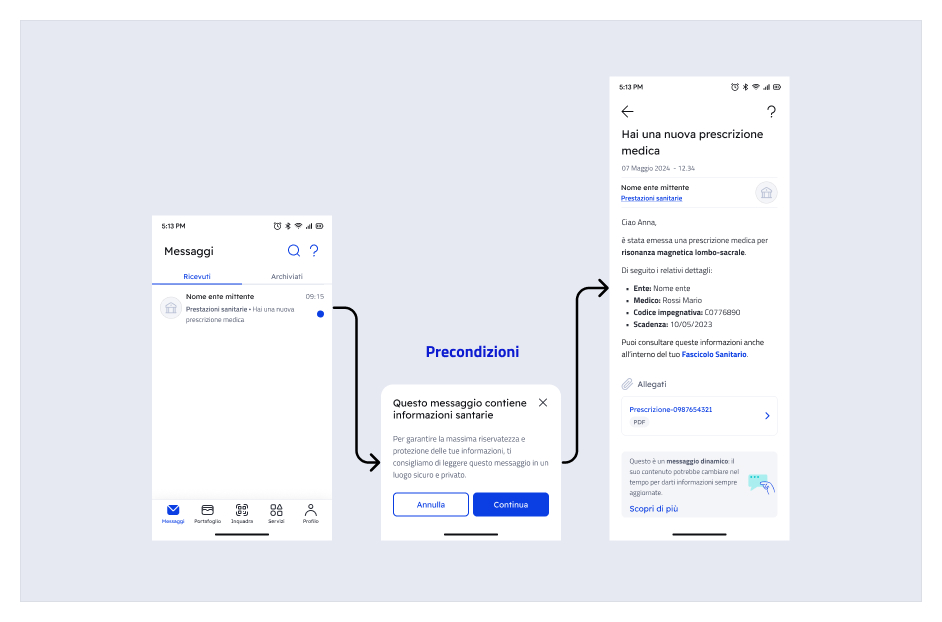
As the sending institution, you can decide that the opening of the message must be preceded by targeted content that informs the recipient about particular aspects or circumstances regarding the message itself.
The preconditions are an intermediate screen between the list of messages and the details of the selected message. The user accesses the message details only after pressing the "Continue” button.
When to use them:
When it is necessary to draw the citizen's attention to fundamental information, and in any case if required by application regulations, for example for legally binding communications, for which opening the message has legal effects for the citizen.
When it is necessary to draw the citizen's attention to fundamental information, and in any case if required by application regulations, for example for legally binding communications, for which opening the message has legal effects for the citizen.
When not to use them:
To transmit notifications that are not strictly correlated to the message content or to add detailed information that can be provided in the message, or in other moments of the user experience.
To transmit notifications that are not strictly correlated to the message content or to add detailed information that can be provided in the message, or in other moments of the user experience.
Important information about the title (subject) of the message
The subject of the message is used by the IO app for three reasons:
- as the subject visible on the list of received messages;
- as a header in the message details, once opened;
- in the text of the push notifications connected to the message (if enabled by the user and if the message/service are not marked by you as containing sensitive information)
Depending on the value of the flag Has_remote_content that you will specify in Third_party_data (see further on in this chapter) the subject of the message will behave differently:
- if Has_remote_content=true, the field Subject indicated at the moment the message was created is used by IO only in the list of received messages.
The header visible in the message details is instead retrieved later (see Cosa succede quando il destinatario apre un messaggio remotizzato).
This means that the two fields could differ. We recommend not to change the subject significantly, in order to maintain the coherence of the information between the two texts. Also remember that pursuant to the IO guidelines, it is not possible to include sensitive information in the subject of the message.
- if Has_remote_content=false or if you do not include the flag, the Subject field will have the standard function of a traditional (not remote) message: the same text content is used in the list of messages and in the message details.
Important information about the body (markdown) of the message
During the phase of creating a message with remote content, it is still necessary, in compliance with the IO API interface, to define a **“courtesy” non-remote text (markdown)**, which will be used to create the email that forwards the message that IO users can select to receive when they are delivered a message in app.
Markdown limits for the purpose of forwarding: min 80, max 134 characters, beyond which the system cuts it off with an ellipsis.
Note about message forwarding via email: If enabled by the end user, a message sent via IO can be forwarded to their email address. The email contains the incipit of the body of the message (the first 134 characters), as well as an invitation to open the app to access the complete content via CTA, which permits the redirect. Here is an example of a forwarding email:
.png)
For messages with remote content, it is mandatory to enter the following additional information in the block Third_party_data:
| Field | Field description |
|---|---|
| Id | This is the remote correlation identifier, which uniquely identifies a specific message directed to a specific recipient. This identifier, determined by you, consists of a string that allows the API to retrieve the remote content for that specific message. |
| Has_precondition | Set this field only if you want for the recipient to be shown a text (with the subject) when opening the message in app that contains context information that you will indicate at the moment (for more information refer to Endpoint di recupero delle precondizioni allapertura del messaggio): once the text is read, the recipient can select whether to continue opening the message or return to the list of received messages; the possible values for this field are:
|
| Has_remote_content | Set the field to true if you want the title (subject) and the body of the message to be remote content; when IO requests them from you via the API that you provided, you must respond with a text string for the subject and a markdown for the body, as if you had specified them at the moment of creating a traditional message; the default setting for this field is false. For more information and to understand the role of the subject in a message with remote content, refer to Endpoint di recupero dei dettagli del messaggio |
| Has_attachments | Set the field to true if you want to attach one or more documents in PDF format to the message: as shown in Endpoint di recupero dei dettagli del messaggio, when IO requests the details of the message from you, you must indicate the metadata for the attachments (name and relative URL); when the recipient will select an attachment in app, IO will retrieve the bytes from your systems, via the API described in Endpoint di recupero dei byte del singolo allegato. |
Message usage phase
What happens when the recipient opens a message with remote content?
In this phase, IO checks the necessary information to retrieve the message at the endpoint you provided.
In particular, if during the Creazione del messaggio remotizzato you indicated Has_precondition with value ONCE or ALWAYS, as soon as the recipient selects the message from the list of messages in app for the first time (=ONCE) or every time (=ALWAYS) IO will retrieve the endpoint to be called from the configuration information, and will invoke your systems to obtain the subject or text of the message as the response to be shown on the pop-up panel of the Precondizioni allapertura.
Following the API call to Endpoint di recupero delle precondizioni allapertura del messaggio you must respond as shown in the example:
1{ "title": "This is the title of the preconditions", "markdown": "This is the text of the preconditions in **markdown** format” }
2
If the recipient selects "Continue", IO will proceed with displaying the message in app; otherwise the user will be returned to the list of messages.
If during the Creazione del messaggio remotizzato you indicated Has_remote_content=true, the title and body of the message will be retrieved at the moment it is opened via a call that IO will make to the API you provided (for details refer to Endpoint di recupero dei dettagli del messaggio).

Haven't completed onboarding yet and need help?
Write an email describing your problem or question to the address areariservata@assistenza.pagopa.it.


Tell us what you think
To report problems or give feedback, leave a comment in the GitHub space of the IO app